Desktop app Windows and Mac. Offline-first, and your files stay on your machine. Grab a build from the download page.
Essential Guide
Getting Started with Mangaplay Studio
Watch the one-minute walkthrough, pick the surface you write on, then write a page of panels and watch the storyboard build itself.
Watch it work in one minute
Pistol Taeja walks through writing a script in Google Docs and seeing the panels build themselves in the side panel.
The rest of this page is the written version, and it covers the other three surfaces as well.
Pick where you want to write
Mangaplay reads and writes plain-text .mangaplay.md files. The same file opens on every surface without conversion, so this choice is not permanent — start wherever you already write.
Google Docs A free Chrome extension. You write in an ordinary Google Document and the panels render in the side panel as you type.
Browser The web editor needs no install and no sign-up. Useful on a machine you do not control, like a library or a school computer.
Android and iPhone Mangaplay Screenplay Writer is the mobile app. Same script, same format, in your pocket.
Write your first page
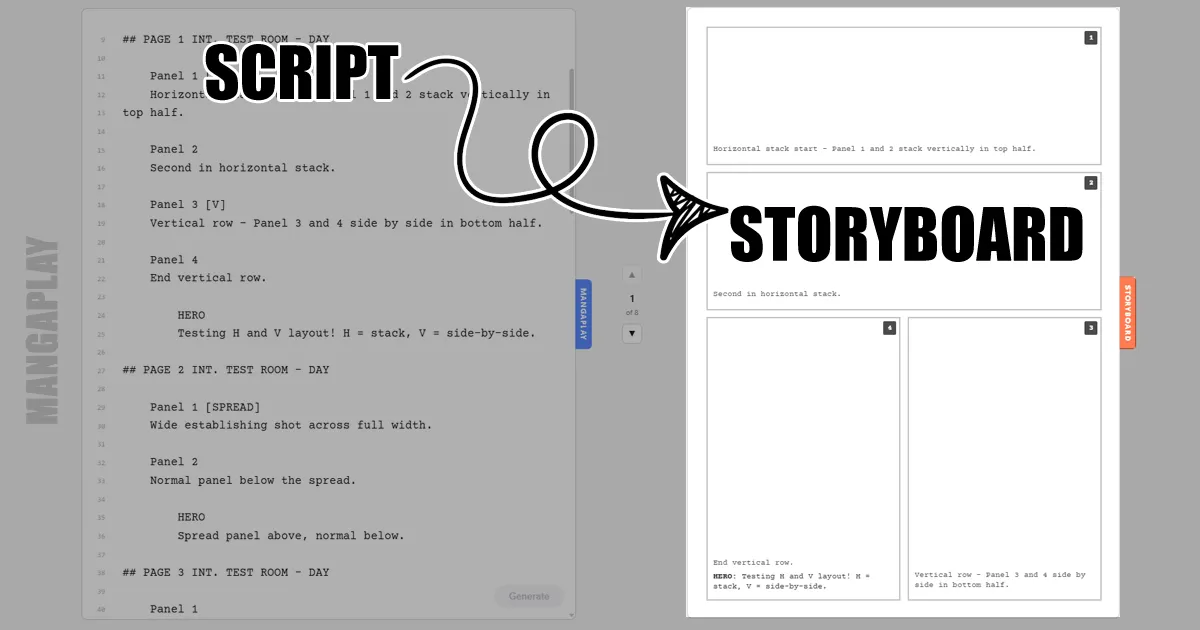
Panels appear because of five things: a title block, a page marker, a panel marker, action lines and dialogue. Nothing else is required.
Title: My First Comic Author: Your Name Format: Manga# Page 1
Panel 1 A city street at night. Rain hammers the pavement.
HERO We should not have come here.
Panel 2 [WIDE] The villain steps out from behind a parked car.
A few rules worth knowing straight away:
# Page 1starts a page. It goes at the very start of the line.Panel 1starts a panel, also at the start of the line. Bracket tags like[WIDE],[V]or[SPREAD]change the panel's shape.- Action is plain prose at the start of the line.
- Dialogue is an ALL-CAPS character name with the spoken lines indented underneath it.
Format: Mangasets right-to-left reading order. Any other value reads left to right.
Change [WIDE] to [SPREAD] and watch the panel take the whole page. That is the whole idea — you are describing shape in words, and the layout is worked out for you. There is no AI involved, and no drawing required.
Taking the script elsewhere
Your script is a plain-text file, so it travels. Mangaplay exports to FDX for Final Draft, Fountain, FadeIn and PDF, which covers most of what an artist, an editor or a screenplay reader will ask you for.
Where to go next
Setup is the easy part. If you are new to comic scripting itself, these go deeper on the craft:
- How to write a comic script in Google Docs — pages, panels and dialogue, worked through end to end.
- How to make a manga in Google Docs — a beginner walkthrough from setup and plot through to finished pages.
- Free comic script template — a script you can copy and start editing immediately.
- Syntax reference — every marker and tag in one page, for when you want the shape you are picturing.
Keep Reading
How to Write a Comic Script in Google Docs
How to write a comic in Google Docs — pages, panels, and dialogue in plain text. Works for manga and graphic novel scripts too. Free sample included.
How to Make a Manga in Google Docs
A beginner-friendly walkthrough of writing a manga in Google Docs — pages, panels, action, dialogue. No drawing software, no expensive tools, just plain text.
The Free Comic Script Template & Manga Template In Google Docs
A free comic script template for Google Docs — pages, panels, dialogue, and a ready-to-go Mangaplay/Fountain++ sample. Open, copy, start writing.