Home → Compare
How Mangaplay Studio, Scrivener, Dashtoon Compare To The Rest
By Pistol Taeja, creator of Mangaplay Studio and Fountain+.
There are few script writing tools that take a comic, manga or graphic novel from script to storyboard in one place — and fewer still that don't lock you into one device.
Superscript was the indie favourite for comic and manga writing until it was discontinued in 2024. Mangaplay Studio is its spiritual successor — script-first, storyboard-aware, and available on every surface you write on.
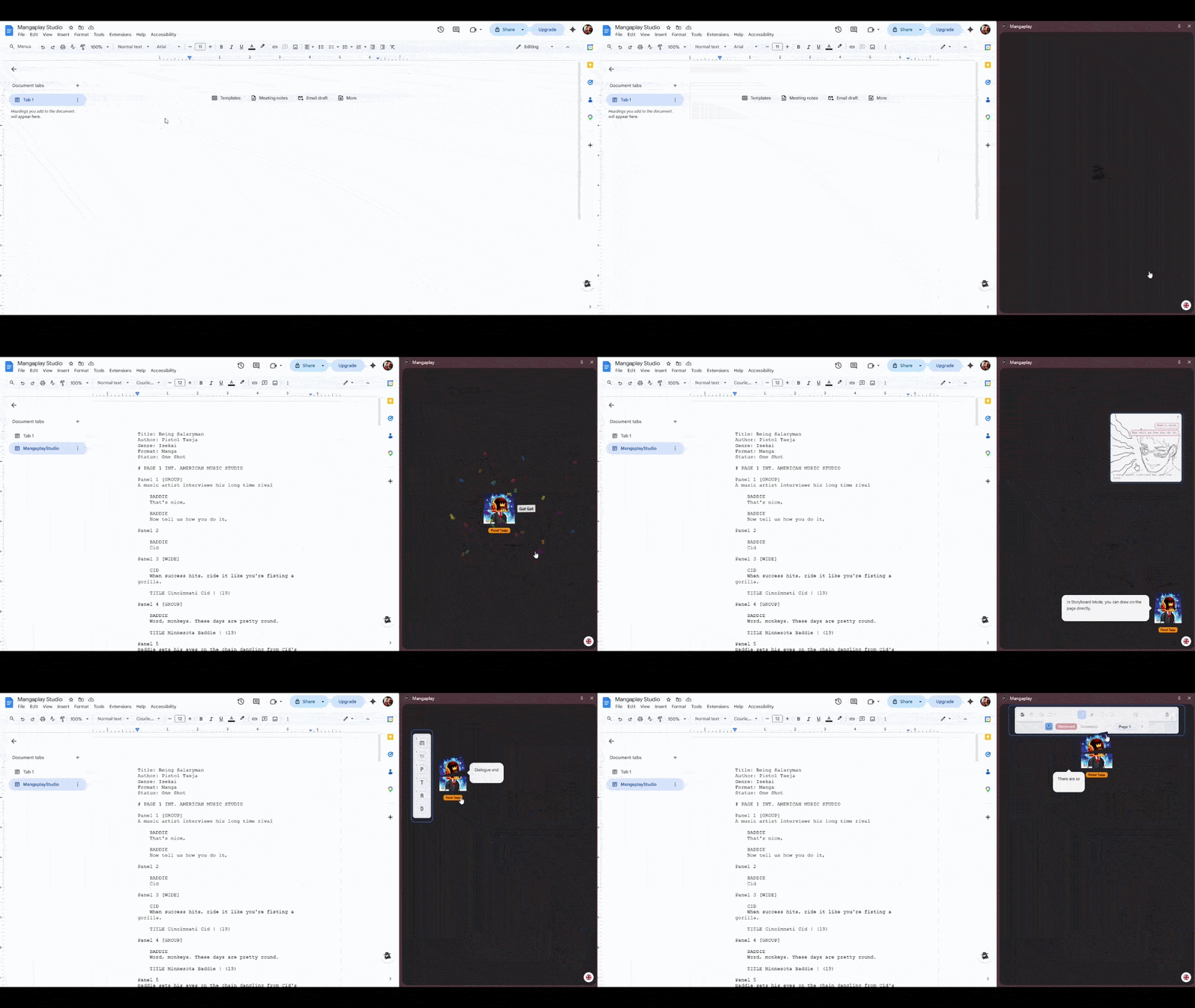
Mangaplay joins script and storyboard in your Desktop app, in Google Docs, in your browser, and (soon) on Android and iOS. Below: where it wins, where alternatives fit better.
Desktop, Docs, Web & Mobile (soon) Script first writing Spiritual successor to Superscript You-draw-it storyboarding
The 2026 Script to Storyboard Landscape
Mangaplay Studio
ActiveScreenplayStoryboard Mangaplay Studio is the spiritual successor to Superscript. Built for indie creators and solo publishers. A graphic novel script written in your Desktop app, Google Docs, the browser (and soon Android/iOS) renders into a live storyboard, with screenplay export when you need it.
Celtx
ScreenplayStoryboard The full pre-production suite for screenplays with breakdowns, schedules and budgets.
Tooning
Storyboard Script-to-webtoon platform with AI-assisted art generation and an asset library. A cartoon panel maker aimed at writers who don't want to draw.
Dashtoon
AI GeneratorStoryboard AI-first comic panel generator. You write a prompt, it produces the artwork.
Scrivener
Screenplay Mature desktop long-form writing app with an Antony Johnston comic-script template. No native panel preview.
Superscript
DiscontinuedScreenplay Cancelled in 2024. It had a clean comic script format, but you had to picture the panels in your head. Mangaplay covers the same script-to-page workflow.
Clip Studio Paint
Storyboard The artistic benchmark for drawing, inking and lining your manga or comic. The drawing features go deep.
Final Draft
Screenplay The industry-standard screenplay software with paid licensing. Strong FDX support, but little to offer for storyboarding comics, manga or graphic novels.
Studio Binder
ScreenplayStoryboard Production management and storyboarding suite focused on film.
Feature Matrix — All 9 Tools
| Feature | Mangaplay | Celtx | Tooning | Dashtoon | Scrivener | Superscript | Clip Studio | Final Draft | Studio Binder |
| Active in 2026 | ✓ | ✓ | ✓ | ✓ | ✓ | Cancelled | ✓ | ✓ | ✓ |
| Free tier | Free | Limited | Limited | Limited | Trial | — | Paid | Paid | Limited |
| Google Docs integration | ✓ | No | No | No | No | — | No | No | No |
| Script-first writing | ✓ | ✓ | Partial | No | ✓ | ✓ | No | ✓ | ✓ |
| Fountain / Fountain+ syntax | ✓ | Partial | No | No | Plugin | — | No | — | No |
| Learning curve | Low | Medium | Medium | Low | Steep | Medium | Steep | Medium | Medium |
| Real-time drawing | ✓ | No | AI | AI | No | — | ✓ | No | Storyboard |
| AI-generated panels | No | No | Yes | Yes | No | — | No | No | No |
| .fdx export | ✓ | Paid only | No | No | ✓ | No | No | ✓ | No |
| Screenplay export | Yes! | FDX paid | No | No | FDX / Fountain / FadeIn | No | No | FDX | PDF / SBX only |
| PDF export | ✓ | Online required | Image only | Image only | ✓ | ✓ | ✓ | ✓ | ✓ |
| Real-time collaboration | ✓ (Google Docs) | ✓ (Paid) | ✓ (Paid) | No | No | No | Team Studio EX | Collab add-on | ✓ (Paid) |
Mangaplay Studio
Mangaplay Studio is the spiritual successor to Superscript — the script-first comic writing tool the indie scene lost in 2024. It picks up the same niche and adds three things Superscript never had: a live storyboard render beside your script, screenplay export, and a writing surface on every device. Write in our Desktop app, in Google Docs, in your browser, and (soon) on Android and iOS.
The tool is free, has no element limits, no sign-up, and works offline as an installable PWA. Scripts are plain-text .mangaplay.md files — a portable comic book script format you can diff, version, email or paste anywhere. Exports to FDX, Fountain, FadeIn and TXT let you hand the same graphic novel script to a writers' room or an artist.
Best For: Indie creators and solo publishers writing a comic book script who want a script-first workflow with their own drawing and screenplay export, on whatever device they're at.
Dashtoon
Dashtoon is great for new manga, comic and graphic novel creators. You type a prompt, see results instantly, and get feedback for your ideas right away. There's no script structure to learn first and no drawing skill to build up — the AI handles the art so you can focus on the story.
The honest trade with Mangaplay is around ownership. Dashtoon's free tier expects you to publish exclusively inside the Dashtoon Reader app, with a 50% revenue share after the first ten free episodes. There's no FDX, Fountain or plain-text script export — your story lives in their database.
Mangaplay's source is a portable .mangaplay.md file you own forever, and the tool is free with no exclusivity. If you want to make a comic book where the panels and the script stay yours, you draw them or hand them to an artist — not to an AI model.
Best For: Creators who want AI to generate the artwork for them and are happy to publish exclusively inside the Dashtoon Reader app, with no need for a portable script source or screenplay export.
Scrivener
Scrivener is the long-form writing app a lot of novelists already own. It ships with a built-in comic script template by Antony Johnston, so a writer who lives in Scrivener for prose can draft a comic script in the same project. It's a script-only tool though — there's no panel preview, no manga page layout, and no Google Docs surface.
Scrivener and Mangaplay can sit side by side rather than competing. Scrivener handles long-form structure — corkboard, outliner, research store — and exports cleanly to Fountain, which Mangaplay imports as a first-class source. Where they diverge: Scrivener is a paid desktop app with a steep compile-to-export learning curve, no real-time collaboration, and no visual storyboard.
Mangaplay is free, runs in the browser or Google Docs, collaborates in real time via Docs, and renders your script for storyboard pages — manga, comic or webtoon — as you type.
Best For: Long-form prose writers and novelists who occasionally write a comic script, want corkboard and outliner views for structure, and don't need a live panel preview.
Superscript
Superscript was the premium choice for a comic script writer on the desktop. It had the tight per-balloon word counts, per-panel summaries and lettering-aware ergonomics comic writers actually wanted. The creator cancelled v2 in 2024 and released the existing app as free open source with no plans to keep building on it — so the niche sits open today.
Mangaplay picks up the same script-first focus and adds what Superscript never had: a live storyboard render beside your script, a Google Docs side-panel surface, and exports to FDX, Fountain, FadeIn and PDF for handing off to artists, editors or writers' rooms.
It's free, actively maintained, and used by the creator on his own published manga — not a frozen 2024 binary you have to compile yourself. The one Superscript feature Mangaplay doesn't yet match is per-balloon word counts, and that's worth saying out loud.
Best For: A comic script writer who wants tight per-balloon word counts on the desktop and doesn't mind running an unmaintained 2024 build with no further updates.
The Verdict
Mangaplay Studio is the spiritual successor to Superscript. In 2026, if you want to write a comic, manga or graphic novel and lay out the storyboards yourself, that's the lane.
Clip Studio Paint, Celtx and Final Draft are production-grade software, each excellent at one specific task.
Mangaplay Studio is the entry-level option that gets a comic panel creator up and running quickly. It's free on Desktop, in Google Docs, and in your browser — Android and iOS are coming soon — and it picks up the script-first niche that opened when Superscript stopped shipping in 2024.
When you're ready for feedback, the same file works as both screenplay and storyboard — pass it around, get notes, then keep building.
There's little reason to fear it being discontinued — Pistol Taeja, the creator of Mangaplay, is actively using it for his own manga, Enemy of the State.
 Download It For Free
  Use with Google Docs