The Free Comic Script Template & Manga Template In Google Docs
A drop-in Google Docs template for a comic script with margins and fonts ready-to-go. The comic script template comes with an ascii art to demonstrate how it could look
What is this comic script template for and how do I use it?
One of the most common questions on the internet about graphic novels and comics is, "How do I write a comic?" Many aspiring artists and writers will have an idea but not be sure what their scripts or art should look like.
This Google Doc gives you a clear structure on how to present individual panels and pages in a manner that other writers and artists can understand.
# PAGE 1

Panel 1
This page is auto-arranged into three panels.

Panel 2
This is an action line for the next panel; it could be a square or rectangle.

Panel 3
The action line for the final panel.

+-------------+
|.....P1......|
+-------------+
|.....P2......|
+-------------+
|.....P3......|
+-------------+
We are telling the reader that on a single page there will be 3 panels layered with one another. We have not explicitly told them whether it's vertical or horizontal, but they can fill in the gaps based on the topic — is it a manga or a comic?
Where can I get the template?
Here, click the link and copy the doc.
This is for any writer or artist, professional or amateur, who wants to open a document and start writing immediately in a well-formatted screenplay document.
The document is correctly set to screenplay margins (1.5" left, 1" right/top/bottom) in Courier Prime 12pt.
The free comic script template also comes with a ready-to-go Mangaplay/Fountain++ script for the most commonly used page layouts.
The file lands in your Drive as a fresh copy — no account, no extension, no waiting for an install. Inside you'll find a small manga example already laid out: a # PAGE header, three numbered panels, an ALL-CAPS character cue, and an indented line of dialogue underneath. Delete it, keep it, rewrite it over the top — it's yours.
This free manga template is built for the writer who wants their first draft to look like a real script the moment they hit "type". You don't need to know the format. You don't need a tutorial. Open the document, replace the sample, and you have something a friend, an artist, or a co-writer can actually read. That's the whole pitch. The manga template does the formatting so you can do the thinking.
What is the Mangaplay Format? It's Fountain++
The Mangaplay format is a plain-text markup built on top of Fountain, a widely used screenplay writing format. Fountain already works well for the creative phase, so rather than reinvent it, Mangaplay expands on it with pages and panels.
Fountain is typically dropped when nearing production for tools like Celtx, but for manga and comic scripting it's a natural fit. You write in a single text file using [TAGS] to describe how you want each panel to look, and it can be rendered as a screenplay, manga, or comic layout in seconds.
That means you can open a text file and write a manga script the same way a screenwriter writes a film. No special software. No proprietary file format. Just a plain-text document that any editor can open, including Google Docs.
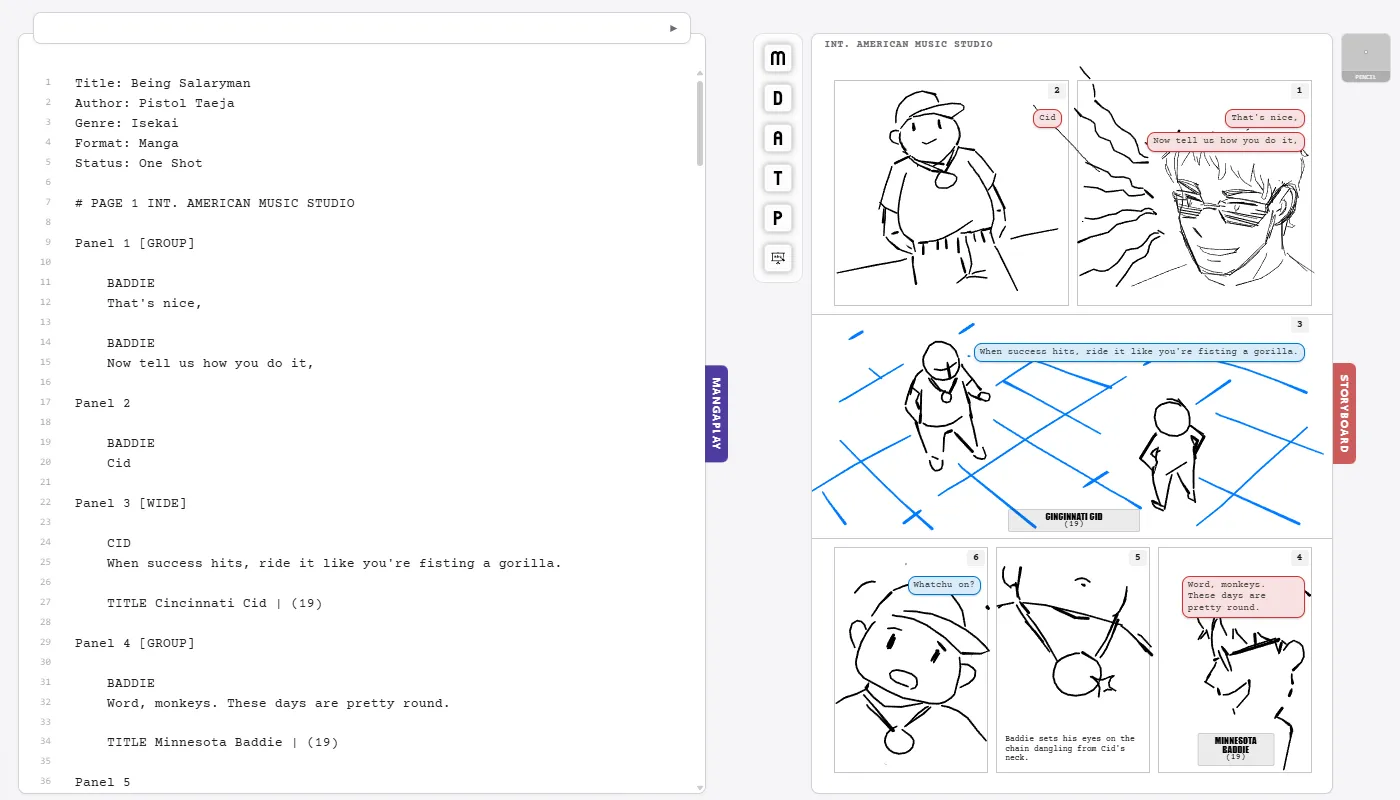
What does MangaPlay Studio do with your script?
I built Mangaplay Studio because I needed it myself while writing SALARYMAN. I struggle seeing images when I close my eyes, to combat this I like going between a Storyboard and Screenplay to better get a feel for the pacing.
Mangaplay Studio is the first web app where you can drop your script into it and the tool will render it as pages with dialogue, action lines, sound effects and even let you download it as a Screenplay thanks to the hard work of the folks who made Fountain.
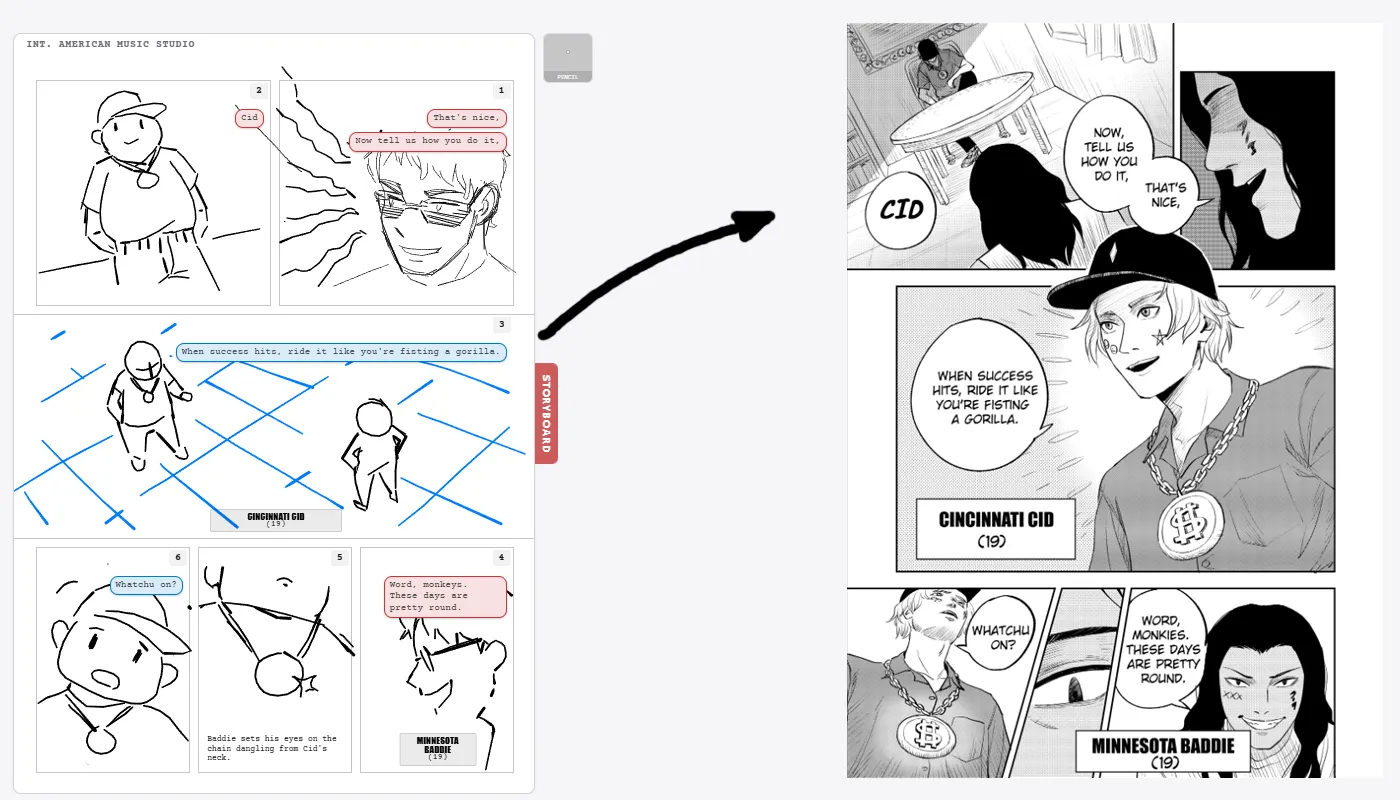
There are two ways to use it, either as the Web App or on the Chrome Extension that works directly inside of Google Docs. Open up an empty document, press the Mangaplay Button and you are good to go. Start writing the next big hit, you don't even have to credit me ;)
Both versions run entirely in your browser, no scripts or AI in sight. Your art stays in your browser.
Mangaplay Studio For Google Docs is the extension for you to visualise your comic or manga in real time as you type.

Who made Mangaplay?
Me, Pistol Taeja, put some respekt on my name!
I am an independent creator, I want to make art and show it to you like a proud child to a parent.
There's a whole ass About Page here. Please be nice to me! Read my manga perhaps too?